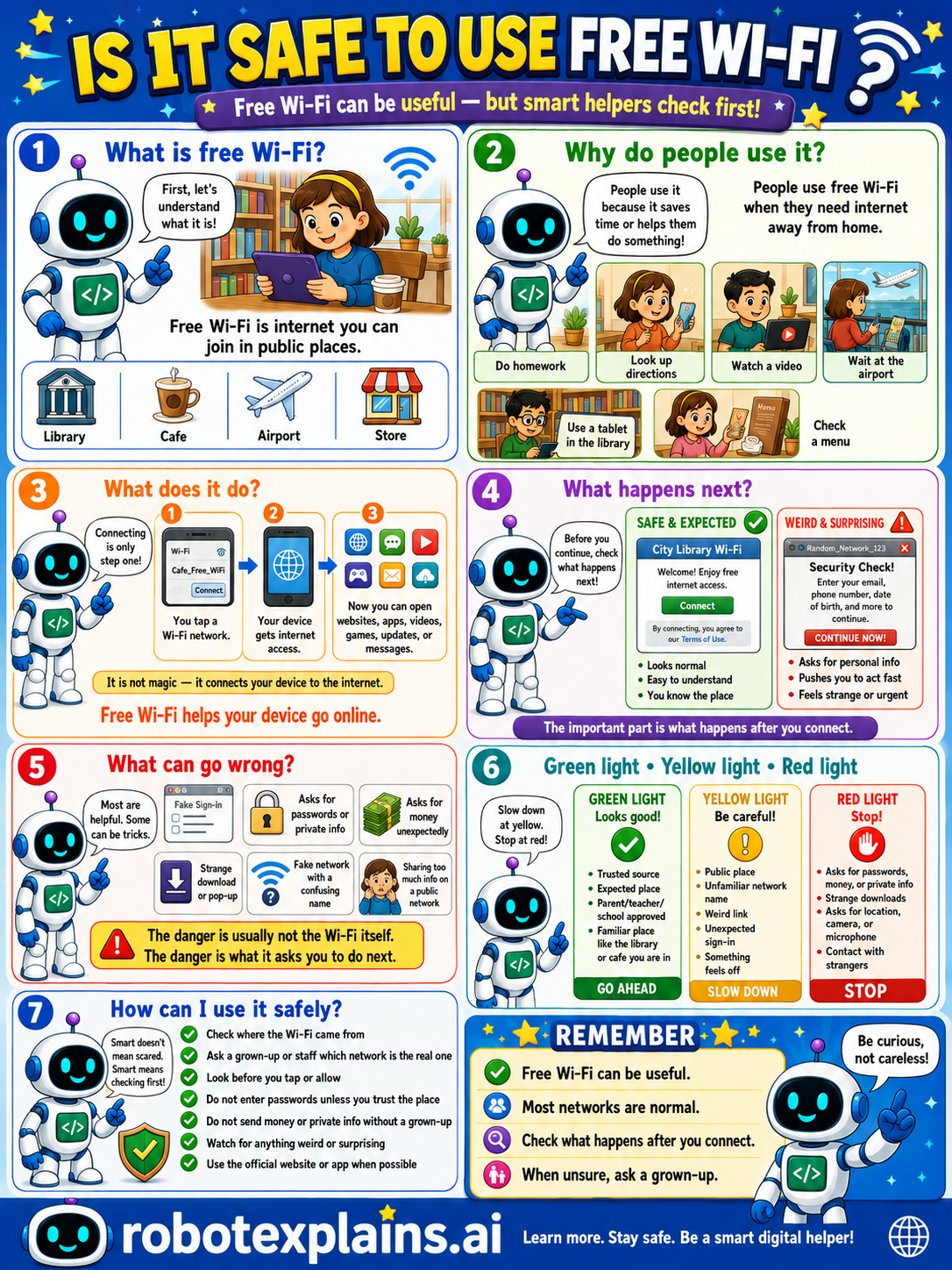
Free Wi-Fi can be useful, but smart helpers check first. So, is it safe to use free Wi-Fi? It can be, if you're careful.
What is free Wi-Fi? First, let's understand what it is. Free Wi-Fi is internet you can join in public places, like a library, café, airport, or store.
Why do people use it? People use it because it saves data and helps them get online, to look up directions, watch a video, wait at the airport, or use a tablet at the library. People use free Wi-Fi when they need internet away from home.
What does it do? Connecting is only step one. You tap a Wi-Fi network, your device gets access, and now you can open websites, apps, videos, games, updates, and messages. It's not magic, it connects your device to the internet.
What happens next? Before you continue, check what happens next. A network from a library or café opens a normal website or simple sign-in, that's safe and expected. But a random pop-up asking for a password, payment info, or a strange download is a weird and surprising red flag. The important part is what happens after you connect.
What can go wrong? Most networks are helpful, but some can be unsafe: a fake sign-in page, asking for passwords or private info, asking for money unexpectedly, a strange download or pop-up, a fake network name, or sharing too much on a public network. The danger is usually not the Wi-Fi itself, it's what it asks you to do next.
Green light, yellow light, red light. A quick way to decide:
- 🟢 Green: a trusted source, an expected place, your parent's or school's network, the library or school you're in — go ahead and enjoy.
- 🟡 Yellow: public places, an unfamiliar network name, a weird link, or something that feels off — slow down and check first.
- 🔴 Red: asks for passwords, money, or private info, asks for location or camera access, or contact with strangers — stop and don't continue.
How can I use it safely? Check where the Wi-Fi came from. Ask a grown-up or staff which network is the real one. Don't enter passwords unless you choose them. Don't send money or private info without a grown-up. Use the official network or app when possible.
Remember: free Wi-Fi can be useful, most networks are normal, and what matters is what happens after you connect. When unsure, ask a grown-up. Be curious, not careless!
What to remember
- Free Wi-Fi can be useful, but it's shared, so be careful.
- It's usually okay for basic browsing.
- Avoid passwords, money, and private info on free Wi-Fi.
- When unsure, ask a grown-up first.
Words to know
- Free Wi-Fi
- Public internet you can join in shared places.
- Shared network
- A network many strangers use at once.
- Private info
- Passwords, money details, and personal data.
- Red flag
- A warning sign that something might be unsafe.
For grown-ups
Public Wi-Fi is convenient but shared and often open, so it's lower-trust by default. The realistic rule isn't 'never use it' — it's 'use it for low-stakes things and protect the sensitive ones.' Casual browsing is generally fine; entering passwords, banking, or personal data on an open network warrants caution (or a trusted connection / grown-up help). The poster teaches the safe-habit version: recognize the shared risk, watch for fake-network and pop-up red flags, and escalate to an adult when unsure.
Want the full story? These go deeper: