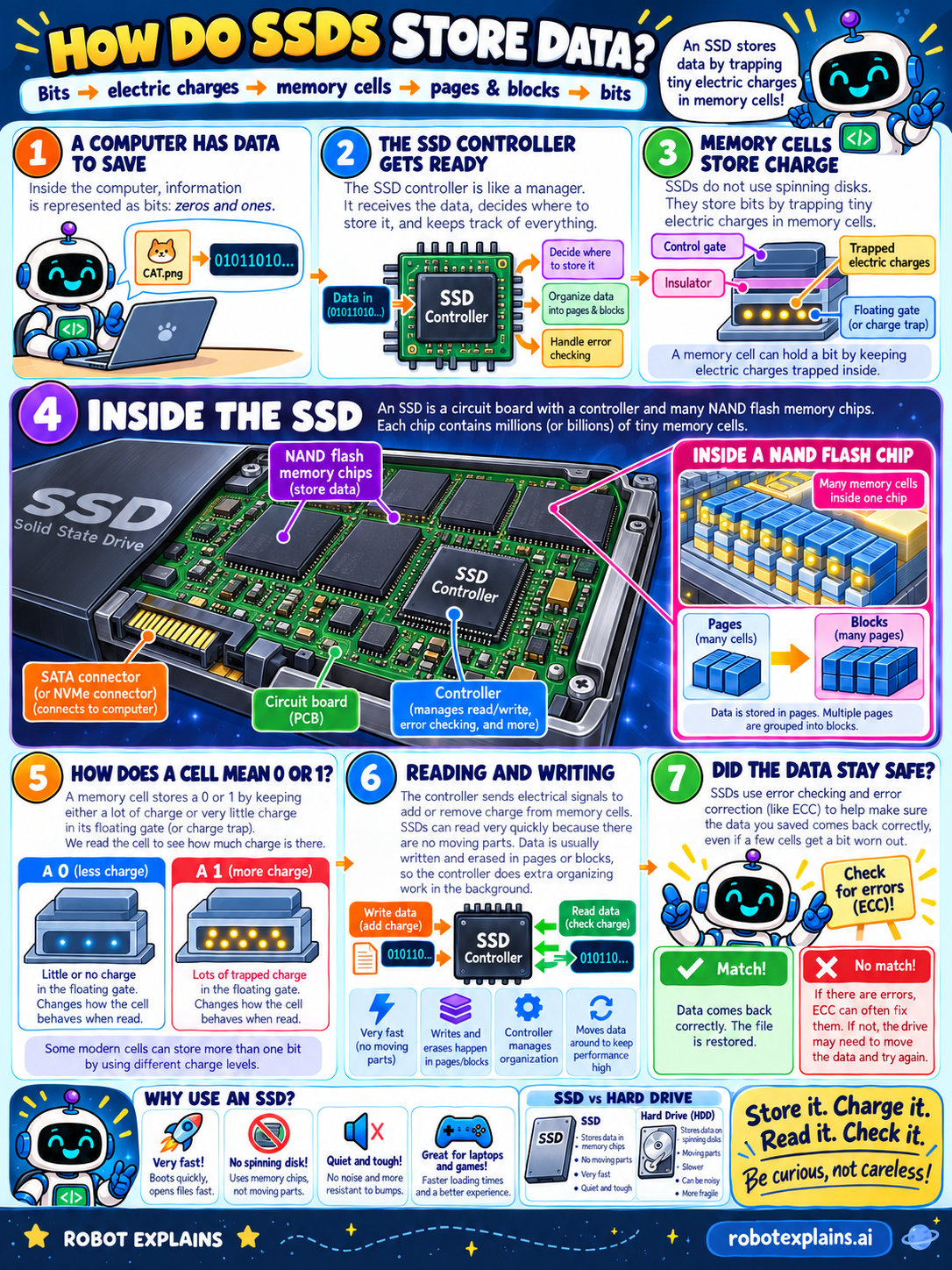
An SSD has no spinning disks, no moving arm, nothing that whirs. So how does it actually hold your files? It traps tiny bits of electricity. Let's peek inside!
Where does it start? Inside the computer, information is represented as bits — zeros and ones. When you save a file like CAT.png, the computer hands those bits to the SSD.
First, the controller gets ready. The SSD controller is like a manager. It receives the data, decides where to store it, organizes it into pages and blocks, and keeps track of everything — including error checking.
Next: the memory cells store charge. SSDs don't use spinning disks. They store bits by trapping tiny electric charges inside memory cells. Each cell has a control gate, an insulator, and a floating gate (also called a charge trap). A cell can hold a bit by keeping electric charge locked inside.
Now, inside the SSD. An SSD is a circuit board with a controller and many NAND flash memory chips. Each chip holds millions — even billions — of tiny memory cells. There's a SATA (or NVMe) connector that plugs into the computer. Cells are grouped into pages, and many pages make a block. That grouping is how the controller keeps everything organized.
How does a cell mean 0 or 1? By how much charge is trapped in its floating gate. Little or no charge reads as a 0. Lots of trapped charge reads as a 1. We read the cell to see how much charge is there. (Clever trick: some modern cells store more than one bit by using several different charge levels!)
Reading and writing. The controller sends electrical signals to add or remove charge from cells. Because there are no moving parts, SSDs can read very quickly. Data is usually written and erased in pages or blocks, so the controller does extra organizing in the background to keep things fast and tidy.
Last question: did the data stay safe? SSDs use error checking and correction (called ECC) to make sure the data you saved comes back correctly — even if a few cells get a little worn out. If everything matches, your file is restored. If there's an error, ECC can often fix it; if not, the drive moves the data somewhere healthier and tries again.
What should we remember? Store it, charge it, read it, check it. An SSD saves your data by trapping tiny charges in cells, a controller keeps it all organized into pages and blocks, and ECC guards it on the way back. SSDs are fast and tough — but all storage can fail someday, so keep backups. Be curious, not careless!
What to remember
- An SSD stores a bit by trapping a tiny electric charge inside a memory cell.
- A controller decides where data goes and organizes it into pages and blocks.
- Little charge means a 0; lots of trapped charge means a 1.
- There are no moving parts, so reading and writing are very fast.
- Error checking (ECC) helps your data come back correctly even if cells wear out.
Words to know
- NAND flash
- The memory chips an SSD uses to hold data as electric charge.
- Memory cell
- A tiny spot that stores one bit by trapping charge.
- Controller
- The SSD's manager chip that handles where data goes and error checking.
- Page / block
- Groups of cells the controller writes and erases together.
- ECC
- Error-correcting code that checks and repairs data as it's read.
For grown-ups
An SSD stores data in non-volatile NAND flash memory. Each cell holds charge on a floating gate isolated by an insulator; the amount of trapped charge sets the cell's threshold, which the controller reads as a 0 or 1 (and multi-level cells store two or more bits using several charge levels). The controller frames everything: it decides placement, groups cells into pages and blocks (flash is written by page and erased by block), runs wear-leveling and garbage collection in the background, and applies ECC. Reads and writes are electrical with no moving parts, which is why SSDs are so fast. Cells wear slowly with write/erase cycles, but ECC corrects the small number of errors that appear, and the controller relocates data from worn areas — so in normal use an SSD lasts for years. As with all storage, keep backups.
Want the full story? These go deeper: